Why dragand clears itself (and why it never deletes your originals)
The idea behind dragand's 24-hour Hold, and the rules that make sure clearing a copy never costs you a file.
 Alfiyan ·
· 4 min read
Alfiyan ·
· 4 min read
On this page 7
Every shelf, stack and “temporary” folder starts out tidy. A month later it’s another junk drawer: forty files you can’t remember saving, and no time to sort them. dragand was built around one idea to stop that from happening, and a handful of rules to make sure that idea never costs you a file.
The problem with keeping everything
Most tools for parking files keep whatever you give them until you clear it. That sounds safe, but it moves the work to later: someone still has to decide what each file was for. Nobody does, so the shelf fills up, and a full shelf is no better than a full Desktop.
Most of what we drag around is only useful for a moment. The PDF you attach to an email. The screenshot you drop into a chat. The export you upload to a website. Once it’s where it needed to go, the copy you parked has done its job.
The rule: temporary unless kept
So dragand has two ways to drop a file, and you choose by where you let go:
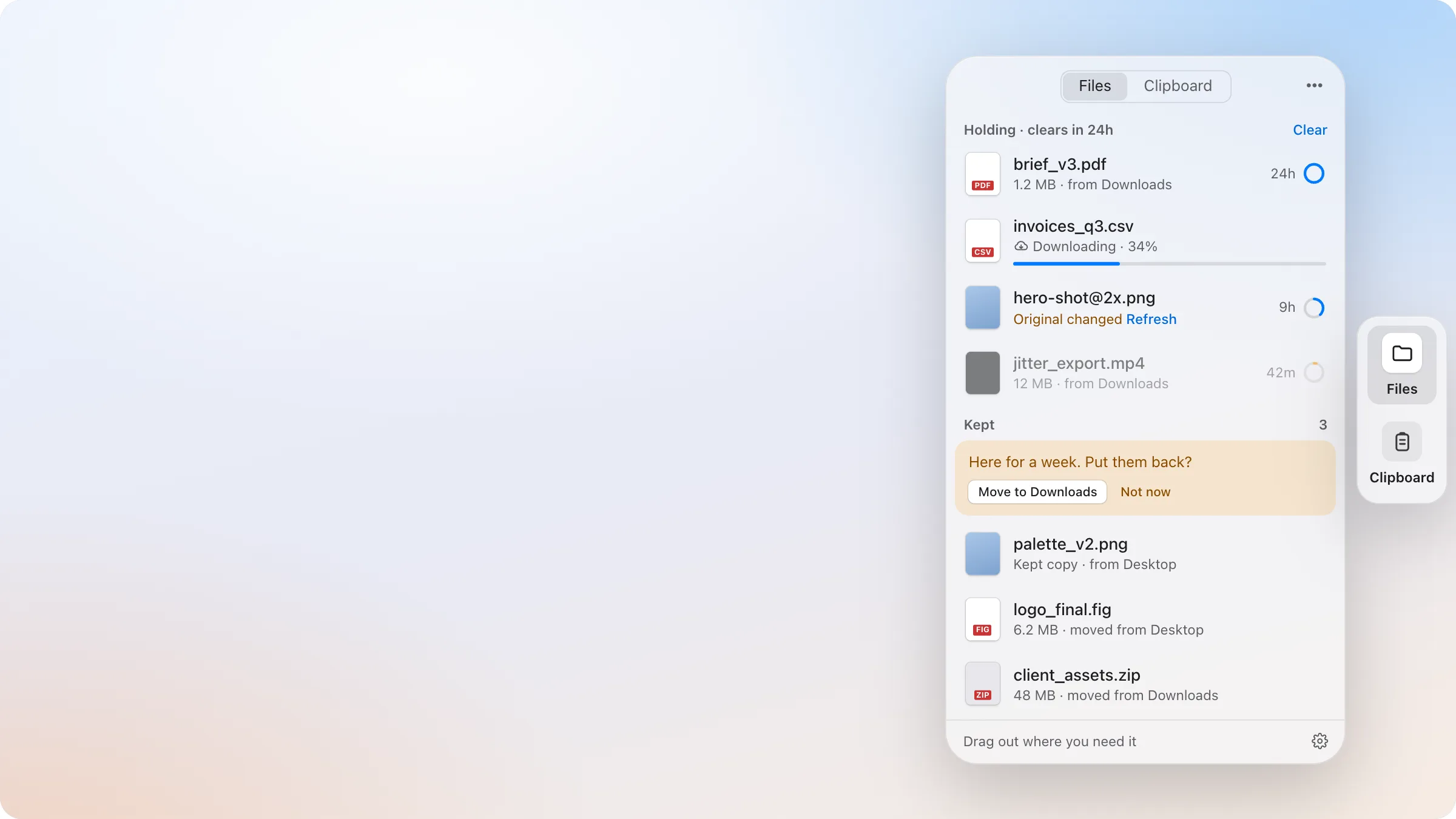
- Hold puts a copy on the shelf for 24 hours, then clears it. Your original stays exactly where it was.
- Keep puts the file itself on the shelf, with no timer. It stays until you drag it out or put it back.
Hold is for the moment: the upload, the attachment, the hand-off. Keep is for “I’ll need this later and don’t know where it goes yet”. The shelf only fills up with things you chose to keep, and everything else takes care of itself.
You can change your mind at any point: hover a held item and click Keep to stop its timer, or Extend for another 24 hours.
Clearing a copy never touches your original
When a held item’s time is up, dragand clears its own copy on the shelf. Never the original file, never anything in your folders. That’s the point of Hold: the copy exists so it can go away.
On the same disk, that copy is instant and takes no extra space until one of the two changes, so holding a large file costs nothing.
The rules that keep it safe
A timer that deletes things needs guard rails. These are dragand’s:
- Nothing clears while you’re using it. Not in the middle of a drag, and not while it’s open in Quick Look.
- Nothing clears in the first hour after your Mac wakes up or dragand starts. Hold counts real time, so a file can come due overnight; instead of vanishing the moment you open the lid, it waits an hour, which gives you time to keep it or drag it out. After a longer sleep, the Files panel says so once: “Nothing clears for the next hour.”
- You can see what’s coming. Every held item shows its time left, and items with under an hour left are marked so they stand out.
- If the original is deleted, the held item says Original deleted with a Keep link. dragand doesn’t decide for you: deleting the original was your choice, so the copy still clears on time unless you keep it. If the file comes back, the mark goes away.
- If the original is edited, the item shows Original changed with Refresh, so you can update the copy before you use it.
Kept files are never deleted
Clearing only ever applies to held copies. A kept file is the only copy there is, so dragand treats it that way:
- It never expires.
- When you drag it out into a Finder folder, it leaves the shelf, with Undo.
- Put Back returns it to the exact folder it came from. If that folder no longer exists, dragand asks where to save it.
- After a week, dragand offers to move week-old kept files to Downloads, so the shelf doesn’t fill up for good. It asks; it never does this on its own, and it never deletes anything. “Not now” asks again a week later.
Undo for everything
Every drop, keep, removal and clear can be undone. After each one, a short note appears with an Undo button and a bar showing how long it stays; ⌘Z works too while the note is showing or the shelf is open. Undo puts things back exactly as they were: a kept file returns to its folder, a removed item comes back.
Why it’s built this way
A self-cleaning shelf only works if you can trust it. If clearing ever cost someone a file, they’d stop using Hold and keep everything, and the shelf would become a junk drawer again. So the rules all point the same way: only copies ever clear, you always see what’s about to, and anything you act on can be undone.
The details of every rule are in How it works.